
← Yn ôl i'r gwaith
Software
Voltrack CRM: connecting the whole solar installation business
A comprehensive operational platform connecting leads, technical surveys, quotes, installation planning and finance — with configurable workflows, tenant separation and job-cost visibility.
One business, one connected journey
A solar installation business has to manage much more than a sales pipeline. An enquiry becomes a survey, a technical specification, a quote, an installation and a series of financial commitments. Each step depends on information captured earlier, but the people responsible for those steps need different views of the work.
Voltrack CRM brings those activities into a connected platform. Cangen’s work spans the application interface, specialist workflows, business configuration and the underlying Laravel and Vue architecture. The aim is to keep the customer and job in context as responsibility moves between sales, office staff, surveyors, installers and finance.
The challenge: connecting the handovers
The difficult part of this product is the relationship between its modules. A quote needs to reflect the proposed work. An installation needs the right customer, site and schedule. An invoice needs to relate to the agreed job. A profitability view needs to distinguish an estimate from costs that have actually been recorded.
We approached the CRM around those connections. Customer records, addresses, surveys, quotes, installations and financial documents have defined relationships, giving teams a way to follow the work beyond their own task list. This also makes the underlying data relationships an important part of the product design: a convenient screen is only useful when it points to the correct job.
Keeping sales work visible and actionable
The sales pipeline gives the team a shared view of enquiries and their progress. Cards bring together customer context, assignment and lead-source information, while configurable stages let a business organise the journey around its own process. Customer records, notes and the sales calendar provide the detail behind that overview.
Follow-up is treated as work that needs an owner and a next action. The platform supports configurable stage-driven tasks and workflow rules, including survey outcomes and quote follow-ups. This gives the office a way to organise what happens after a status change, rather than relying on the pipeline alone to explain what someone should do next.
Lead-source and marketing information connect the start of the journey to later activity. That creates a foundation for reviewing where enquiries originate and how they progress, with interpretation tied to the business’s configured process. It avoids treating every enquiry, sale and completed installation as the same outcome.
Surveys built around the installation
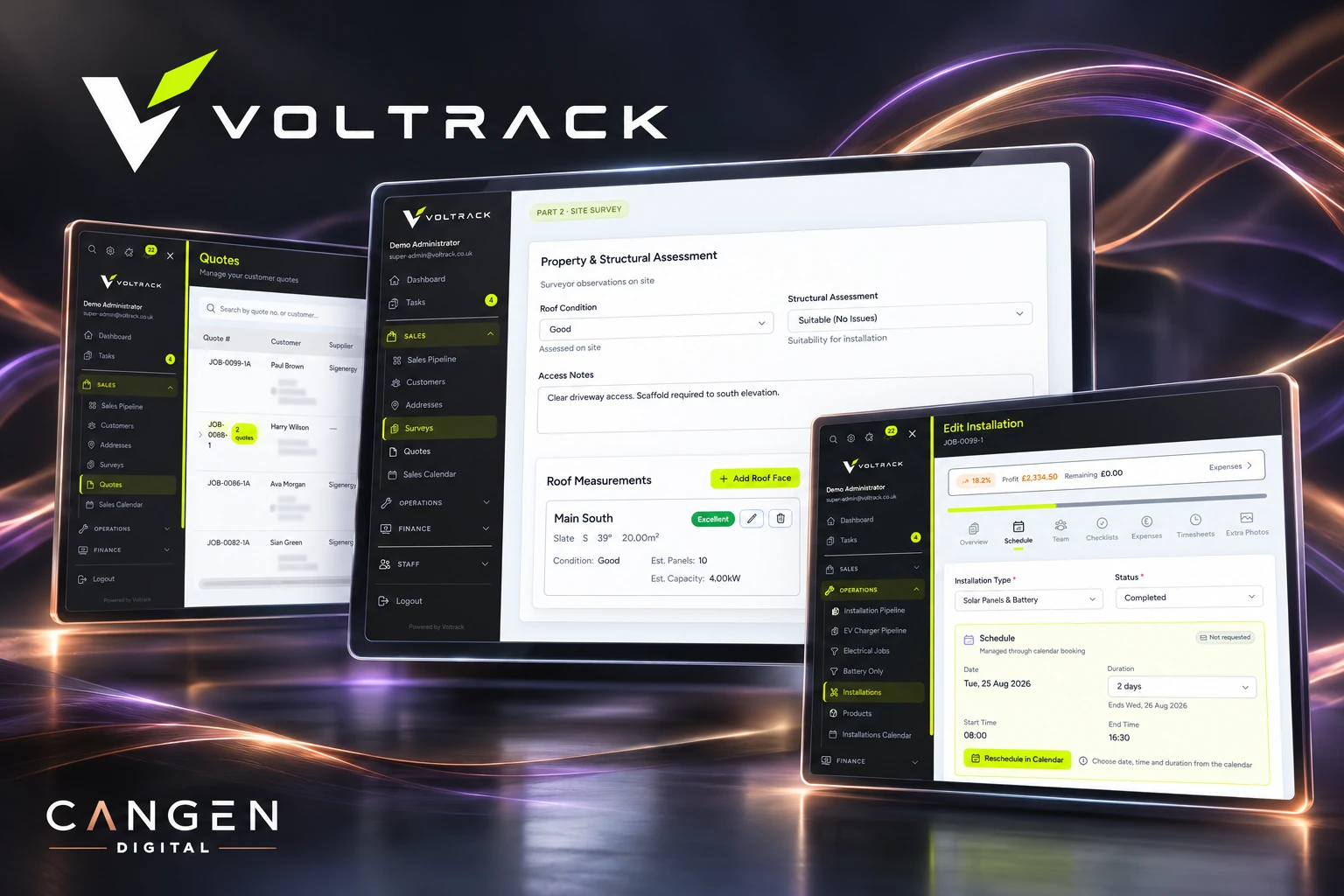
Solar work needs information that a general contact database does not capture. Voltrack’s survey workflow includes property and structural assessment, roof measurements, electrical details, access information and supporting photographs. Pre-survey responses can add context before the visit.
Structured fields give technical information a consistent place to live, alongside the customer and property it belongs to. The purpose is practical: help the next person understand the site and proposed work without having to reconstruct the survey from scattered notes. The interface combines detailed forms with the wider customer and job context, keeping specialist information connected to the rest of the operation.
From a proposed system to an agreed quote
Quoting brings products, line items, prices and costs into a document that relates to the proposed job. Quote statuses distinguish work in preparation from documents sent to the customer and proposals that have been accepted. Public quote views provide a customer-facing route into that process.
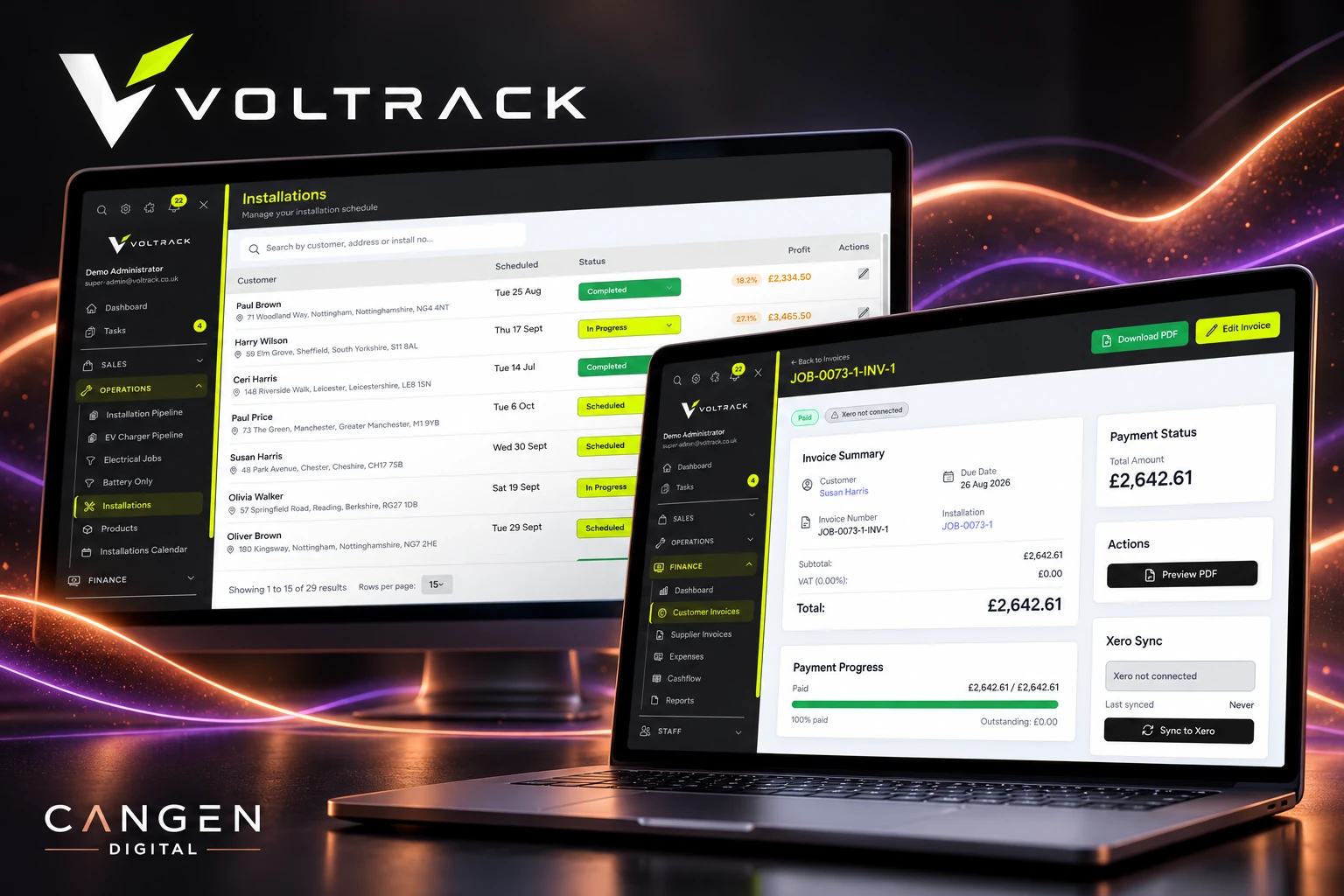
Payment milestones connect the commercial agreement to the way the job will be billed. The application can generate invoices from an accepted quote according to configured payment stages and job types. Invoice delivery has its own controls, including scheduling, business-hour settings and administrative pause or send actions.
This is an important distinction in the product: accepting a proposal, creating an invoice and sending it are related events with different responsibilities. The workflow supports those connections while allowing the business to control how automation is enabled.
Planning delivery and recording the work
Once a job moves into delivery, the team needs a view of the installation itself. Voltrack provides installation records, scheduling, staff assignments and checklists, alongside timesheets and expense recording. These tools connect planned work with the people doing it and the costs being recorded against it.
The installation becomes a useful reference point across operational and financial views. Office staff can inspect status and scheduling, while recorded labour and expenses feed the job-cost picture.
Making the numbers easier to interpret
Financial visibility depends on keeping different numbers distinct. A quote describes the proposed commercial position. An invoice records an amount billed. A payment records money received. Recorded labour and expenses describe costs entered against the work. None of those figures should silently stand in for another.
Voltrack includes quote and invoice profitability calculations, installation-level finance views and shared job-cost logic. The application brings relevant line-item costs, recorded labour and expenses together so the team can inspect the financial position with the underlying records in context. Commission is also represented in the profitability logic where applicable.
That creates a more useful basis for reviewing a job than a selling price alone. It also keeps an honest boundary around the information: the picture depends on the costs, timesheets, invoices and payments that have been entered. The software provides the connected view; it does not turn unrecorded costs into reliable profit.
Automation with checks around the action
Workflow automation can remove repetitive administration, but it needs to cope with records changing after work has been queued. Voltrack’s task and invoicing workflows include checks for current status, duplicate work and the record that triggered the action. Configurable rules determine when automation should act and who should receive the work.
For quote-driven invoices, queued jobs and locking help protect against duplicate creation, while delivery checks account for the current quote and recipient state. Stage-based task rules can reassess whether an action is still appropriate. These details matter because a reliable workflow has to handle rescheduling and changed decisions as well as the straightforward path.
A platform that different businesses can configure
The CRM is designed to support separate tenant businesses. Domain-based tenant selection establishes the business context, with separate tenant databases and tenant-aware filesystem and queued-work handling. Role and feature permissions govern access to relevant functions within the application.
Configuration extends into the experience itself: business branding, colours, document and message templates, workflow settings and team permissions. This lets the product support differences between businesses while retaining a common application foundation. It also makes tenant context and permissions an architectural responsibility across modules, rather than a setting applied only to the dashboard.
Integrations that respect their boundaries
External services sit around the core workflow. The application includes integrations for communication, calendars and accounting, including supported Xero invoice and payment workflows. Accounting configuration and document validation are important parts of that connection; the platform exposes sync state rather than assuming every attempted export has succeeded.
For supported Xero operations, stable identifiers, locking and persisted state help manage repeat requests and uncertain responses. The integration is described around the workflows implemented, rather than as unrestricted two-way synchronisation of every accounting record.
Laravel, Inertia and Vue provide the application foundation, with queued processing for work that should happen outside an interactive page request. This supports a product with detailed operational screens and background workflows while keeping the customer and job relationships at its centre.
The result: a broader operational product
Voltrack CRM connects sales, technical surveys, quoting, installation planning and finance within one application. Its value as a product comes from the handovers: carrying customer and job context forward, connecting an accepted proposal to billing, and bringing recorded delivery costs into financial review.
The result is a configurable foundation for running a specialist installation business, with room to extend individual workflows as requirements evolve.
A solar installation business has to manage much more than a sales pipeline. An enquiry becomes a survey, a technical specification, a quote, an installation and a series of financial commitments. Each step depends on information captured earlier, but the people responsible for those steps need different views of the work.
Voltrack CRM brings those activities into a connected platform. Cangen’s work spans the application interface, specialist workflows, business configuration and the underlying Laravel and Vue architecture. The aim is to keep the customer and job in context as responsibility moves between sales, office staff, surveyors, installers and finance.
The challenge: connecting the handovers
The difficult part of this product is the relationship between its modules. A quote needs to reflect the proposed work. An installation needs the right customer, site and schedule. An invoice needs to relate to the agreed job. A profitability view needs to distinguish an estimate from costs that have actually been recorded.
We approached the CRM around those connections. Customer records, addresses, surveys, quotes, installations and financial documents have defined relationships, giving teams a way to follow the work beyond their own task list. This also makes the underlying data relationships an important part of the product design: a convenient screen is only useful when it points to the correct job.
Keeping sales work visible and actionable
The sales pipeline gives the team a shared view of enquiries and their progress. Cards bring together customer context, assignment and lead-source information, while configurable stages let a business organise the journey around its own process. Customer records, notes and the sales calendar provide the detail behind that overview.
Follow-up is treated as work that needs an owner and a next action. The platform supports configurable stage-driven tasks and workflow rules, including survey outcomes and quote follow-ups. This gives the office a way to organise what happens after a status change, rather than relying on the pipeline alone to explain what someone should do next.
Lead-source and marketing information connect the start of the journey to later activity. That creates a foundation for reviewing where enquiries originate and how they progress, with interpretation tied to the business’s configured process. It avoids treating every enquiry, sale and completed installation as the same outcome.
Surveys built around the installation
Solar work needs information that a general contact database does not capture. Voltrack’s survey workflow includes property and structural assessment, roof measurements, electrical details, access information and supporting photographs. Pre-survey responses can add context before the visit.
Structured fields give technical information a consistent place to live, alongside the customer and property it belongs to. The purpose is practical: help the next person understand the site and proposed work without having to reconstruct the survey from scattered notes. The interface combines detailed forms with the wider customer and job context, keeping specialist information connected to the rest of the operation.
From a proposed system to an agreed quote
Quoting brings products, line items, prices and costs into a document that relates to the proposed job. Quote statuses distinguish work in preparation from documents sent to the customer and proposals that have been accepted. Public quote views provide a customer-facing route into that process.
Payment milestones connect the commercial agreement to the way the job will be billed. The application can generate invoices from an accepted quote according to configured payment stages and job types. Invoice delivery has its own controls, including scheduling, business-hour settings and administrative pause or send actions.
This is an important distinction in the product: accepting a proposal, creating an invoice and sending it are related events with different responsibilities. The workflow supports those connections while allowing the business to control how automation is enabled.
Planning delivery and recording the work
Once a job moves into delivery, the team needs a view of the installation itself. Voltrack provides installation records, scheduling, staff assignments and checklists, alongside timesheets and expense recording. These tools connect planned work with the people doing it and the costs being recorded against it.
The installation becomes a useful reference point across operational and financial views. Office staff can inspect status and scheduling, while recorded labour and expenses feed the job-cost picture.
Making the numbers easier to interpret
Financial visibility depends on keeping different numbers distinct. A quote describes the proposed commercial position. An invoice records an amount billed. A payment records money received. Recorded labour and expenses describe costs entered against the work. None of those figures should silently stand in for another.
Voltrack includes quote and invoice profitability calculations, installation-level finance views and shared job-cost logic. The application brings relevant line-item costs, recorded labour and expenses together so the team can inspect the financial position with the underlying records in context. Commission is also represented in the profitability logic where applicable.
That creates a more useful basis for reviewing a job than a selling price alone. It also keeps an honest boundary around the information: the picture depends on the costs, timesheets, invoices and payments that have been entered. The software provides the connected view; it does not turn unrecorded costs into reliable profit.
Automation with checks around the action
Workflow automation can remove repetitive administration, but it needs to cope with records changing after work has been queued. Voltrack’s task and invoicing workflows include checks for current status, duplicate work and the record that triggered the action. Configurable rules determine when automation should act and who should receive the work.
For quote-driven invoices, queued jobs and locking help protect against duplicate creation, while delivery checks account for the current quote and recipient state. Stage-based task rules can reassess whether an action is still appropriate. These details matter because a reliable workflow has to handle rescheduling and changed decisions as well as the straightforward path.
A platform that different businesses can configure
The CRM is designed to support separate tenant businesses. Domain-based tenant selection establishes the business context, with separate tenant databases and tenant-aware filesystem and queued-work handling. Role and feature permissions govern access to relevant functions within the application.
Configuration extends into the experience itself: business branding, colours, document and message templates, workflow settings and team permissions. This lets the product support differences between businesses while retaining a common application foundation. It also makes tenant context and permissions an architectural responsibility across modules, rather than a setting applied only to the dashboard.
Integrations that respect their boundaries
External services sit around the core workflow. The application includes integrations for communication, calendars and accounting, including supported Xero invoice and payment workflows. Accounting configuration and document validation are important parts of that connection; the platform exposes sync state rather than assuming every attempted export has succeeded.
For supported Xero operations, stable identifiers, locking and persisted state help manage repeat requests and uncertain responses. The integration is described around the workflows implemented, rather than as unrestricted two-way synchronisation of every accounting record.
Laravel, Inertia and Vue provide the application foundation, with queued processing for work that should happen outside an interactive page request. This supports a product with detailed operational screens and background workflows while keeping the customer and job relationships at its centre.
The result: a broader operational product
Voltrack CRM connects sales, technical surveys, quoting, installation planning and finance within one application. Its value as a product comes from the handovers: carrying customer and job context forward, connecting an accepted proposal to billing, and bringing recorded delivery costs into financial review.
The result is a configurable foundation for running a specialist installation business, with room to extend individual workflows as requirements evolve.
Y canlyniadau
A connected, configurable CRM for solar installation businesses: customer and job records across sales, surveys and delivery; quote-to-invoice workflows with controlled automation; installation scheduling, timesheets and expenses; and financial views that distinguish quoted value, invoiced revenue, payments and recorded costs. Built on a tenant-aware Laravel and Vue foundation with permissions, business branding and supported integrations.
Oriel y prosiect
Yn barod i ddechrau eich prosiect?
Gadewch i ni greu rhywbeth gwerth siarad amdano. Cysylltwch â ni i drafod beth sydd gennych mewn golwg.